29 Jul 2026
How to Set Up Billing in Google Ads
Before you can launch Google Ads campaigns, you must configure billing and add a valid payment method to your account. This guide explains how to set up Google Ads billing, and choose the correct payment profile.
Guide
Goal:
Set up billing for your Google Ads account so payments can be processed and campaigns can run without interruption.
Ideal Outcome:
Billing is successfully configured, allowing you to launch and manage Google Ads campaigns.
Prerequisites or Requirements:
You must have access to an active Google Ads account. If you do not yet have one, follow SOP 014 (web version): Create a Google Ads Account before proceeding.
Why This Is Important:
Billing configuration is mandatory for running Google Ads. Without a valid payment method on file, your ads will not be eligible to serve.
Where This Is Done:
Google Ads Manager.
When This Is Done:
Before launching any Google Ads campaigns.
Who Does This:
The business owner or the person responsible for account administration.
Set Up Billing for a Google Ads Account
- Go to https://ads.google.com/ and sign in to your Google Ads account.
- Select the account for which you want to configure billing.
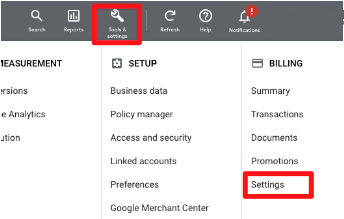
- From the top navigation menu, click Tools & Settings, then select Billing & Payments.
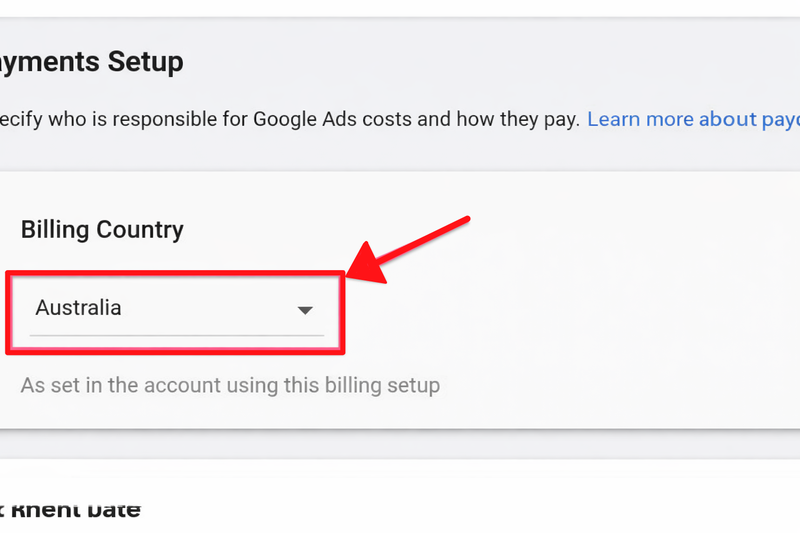
4. Choose the country that matches your business address.
5. Scroll down and complete the payment details:
- Payment Profile:
The Google account you are logged in with will automatically be linked to this payment profile and used for billing transactions. - Account Type:
Select Organisation if you have a registered business. Select Individual if you are operating as a sole trader. This information may be used for tax and identification purposes. - Credit Card Details:
Enter valid payment details (Visa, Mastercard, or American Express). - Address:
Provide your billing or mailing address.
6. Click Submit to complete the billing setup.
You have now successfully set up billing for your Google Ads account.
Important:
Advertising costs accrued in your Google Ads account are automatically charged to your payment method. You will be billed either:
- 30 days after your last payment, or
- Once your spend reaches your billing threshold (set by Google based on account history; new accounts typically have lower thresholds, often $500 or less).
Sidenote:
Ensure your credit card limit can support your intended ad spend. For example, if you plan to spend $10,000 per month but your credit limit is only $5,000, payment failures may occur and your ads could stop running.