29 Jul 2026
How to Do Keyword Research and Build an SEO Sitemap
Effective keyword research underpins every successful SEO strategy. This guide explains how to identify high-value keywords, group them by intent and build a structured sitemap to support long-term organic growth.
Guide
Goal: Identify high-volume keywords that are easy to target (meaning they have low competition), align with your website’s niche, and can be grouped by search intent and demand. The final objective is to create an initial sitemap based on these keyword groupings.
Ideal Outcome: A comprehensive keyword strategy that SEO specialists and content marketers can rely on for planning and execution over the coming months.
Why this is important: While keyword research is not the only factor in successful Search Engine Optimisation, it is the most critical one. A strong keyword strategy can provide a competitive advantage over larger competitors, help determine what to prioritise next, identify hiring needs, and guide budget decisions. It can also be used to shape your site structure and define your content marketing calendar.
Where this is done: In your web browser, within a keyword research tool, and inside a spreadsheet used to organise and analyse keyword data.
When this is done:
- Before creating or redesigning your website
- Regularly, at least once per year, to refresh your SEO strategy
- Before launching an SEO or content marketing initiative
Who does this: The SEO Specialist or a trained Virtual Assistant (VA) is responsible for keyword research and keyword mapping. If neither an internal resource nor an agency is available, this task will need to be completed by you.
Before Starting: Understand the SEO Keyword Mechanism
SEO keywords are the words and phrases users type into search engines when looking for a business, product, service, or information.
The better your website is optimised for these keywords, the more likely it is to appear among the top results on a search engine results page (SERP).
Keep in mind that SEO is not solely about keywords. While they are a crucial component of optimisation, they are not the only factor that determines rankings.
Keyword research can be performed using a variety of tools. Historically, Google’s Keyword Planner was the preferred option for many SEO professionals. However, Google has increasingly limited keyword data and suggestions, particularly for users who do not actively run paid Google Ads campaigns.
As a result, SEO professionals now rely more heavily on third-party tools. Common options include:
- KWFinder (10-day free trial)
- SEMrush (free with limited functionality, very powerful when paid)
- SEOBook’s Keyword Tool (solid free option)
For this SOP, KWFinder is used due to its strong balance between cost and data quality.
Environment Setup
- Sign up for KWFinder, or request access if your company already has an account
- Ensure you have access to Excel, Google Sheets, LibreOffice Sheets, or a similar spreadsheet tool
- Be patient. While the process is not difficult, it can be time-consuming. The more effort you put into it, the better the results will be.
Run an In-Depth Keyword Research
For this SOP, a fictional example is used: a plumbing company in Australia that is building a new website and wants to ensure homeowners can find it through Google searches. All steps in this SOP are based on this example, but should be adapted to suit your specific business or industry.
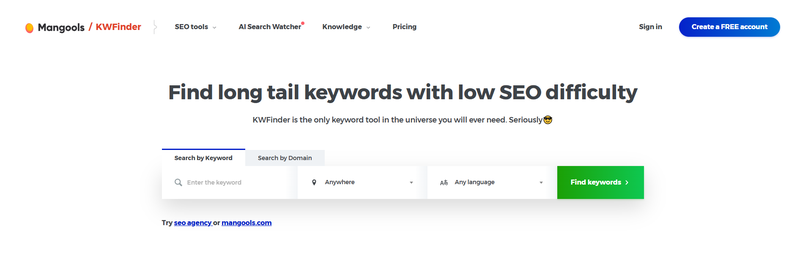
Go to http://kwfinder.com.
Set your business location using the location selector in the centre of the page. By default, this is set to “Anywhere”, but you can click it and enter your desired location (e.g. Australia, New South Wales, or Sydney NSW).
Our recommendation is to start with a broader location (such as Australia) and narrow it down using a more specific keyword phrase (e.g. “plumbing company Australia” or “plumber Sydney”). This approach helps uncover both national and location-specific keyword opportunities.
Enter your search term into the field labelled “Enter keyword.”
Click the “Find Keywords” button or press Enter on your keyboard.
A list of keyword suggestions will appear. For each keyword, you will see:
- The average monthly search volume (in the “Search” column)
- The ranking difficulty score (in the “Difficulty” column)
Use this data to identify keywords that balance strong demand with manageable competition.
Choose the Sorting Criteria in KWFinder
Suggestions:
This is the default and recommended sorting option. It organises keywords based on relevance to the primary keyword you searched.
Example primary keyword: “plumbing company Australia.”
Search:
Use this option only if you want to view keywords strictly by search volume. This is generally not recommended, as effective keyword targeting should consider both search volume and search intent.
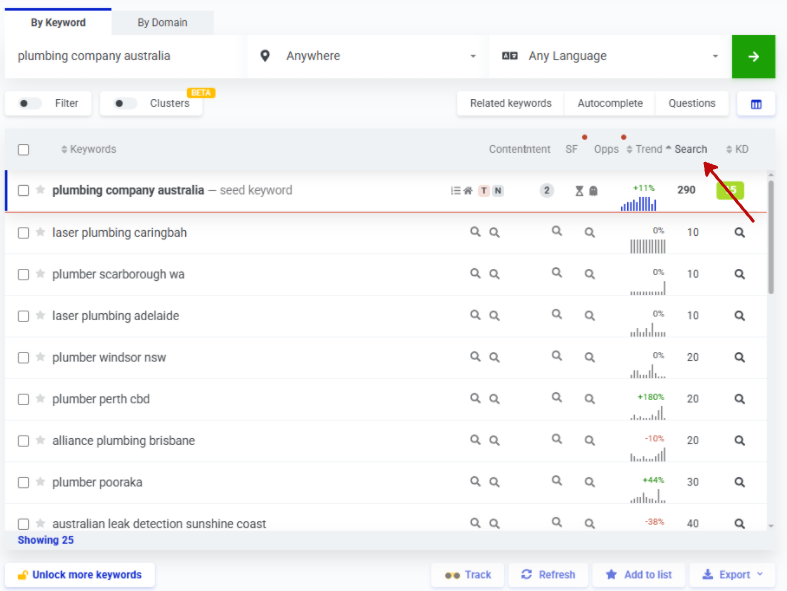
PPC and CPC are sorting criteria primarily used for paid advertising campaigns (such as Google Ads). These options are generally not required for keyword research and mapping.
Diff:
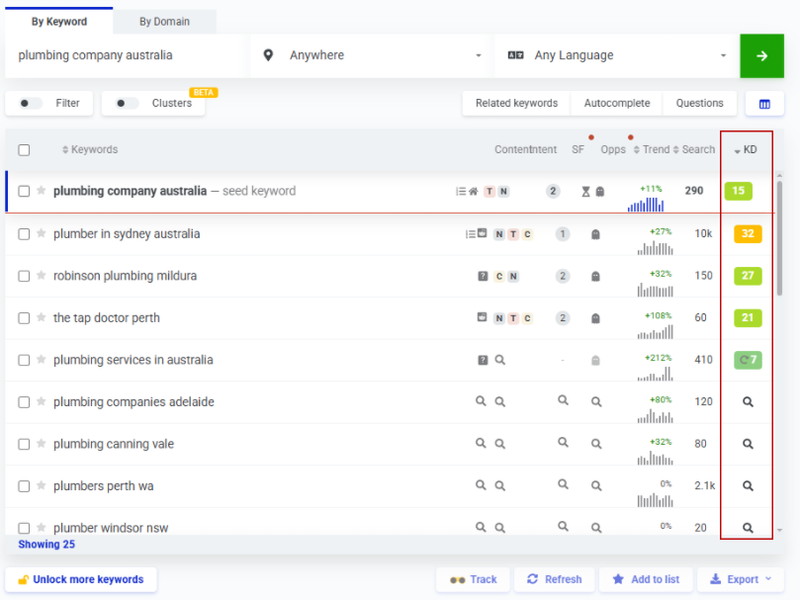
Sorts keywords by ranking difficulty. Before using this option, ensure all relevant keywords have a difficulty score generated.
You can find the keyword difficulty score in the “KD” column. If a keyword does not yet have a score, click the magnifying glass icon and KWFinder will generate one using current data.
Ensure difficulty scores are generated for all keywords that are important and relevant to your business, as these will later be added to your keyword list.
Tick each keyword that you consider suitable for your website. When making selections, consider:
- Search intent (what the user is trying to achieve)
- Search demand (average monthly search volume)
- Keyword difficulty
At this stage, do not worry about keywords being too broad or covering different topics. The goal is to build a comprehensive list that can be refined later.
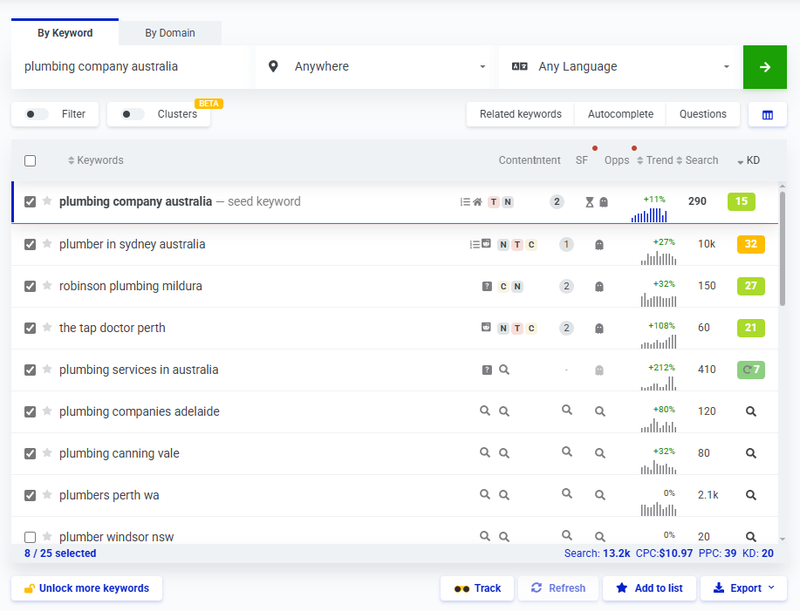
Add the selected keywords to your list by clicking the green “Add to list” button at the bottom of the page.
If this is a new project, create a new list (e.g. “Australian Plumbing Keyword Research”). If not, select the existing list you want to use.
Expand Your Research
Once you finish selecting keywords from the initial list, continue by going deeper.
Review related keywords for each selected term by clicking the arrow icon next to the keyword.
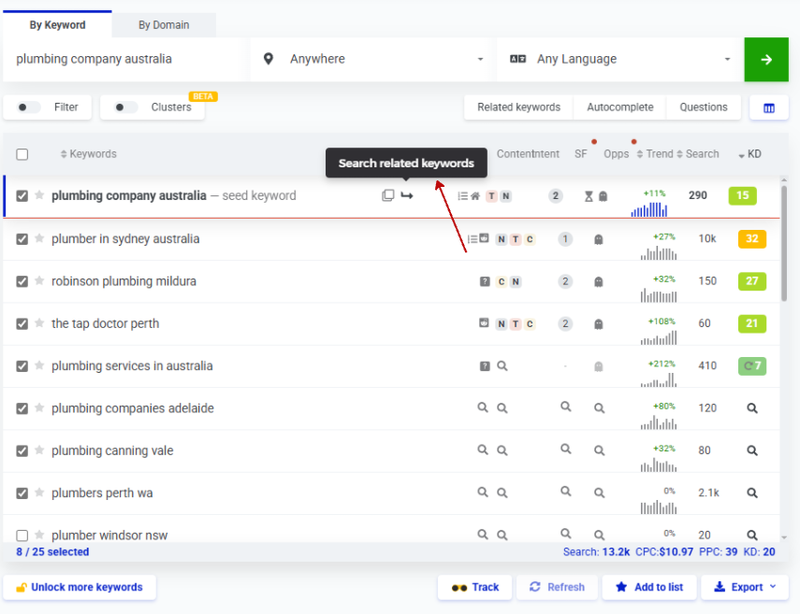
After completing the “Suggestions” tab, repeat the same process using the “Autocomplete” tab. This displays keyword ideas similar to Google’s autocomplete predictions and often uncovers additional opportunities.
Repeat the process again using the “Questions” tab. This generates question-based search queries. You may need to use broader keywords (e.g. “plumber” instead of “emergency plumber Sydney”). Many of these phrases are excellent blog topic ideas, so add relevant ones to your list.
Map Your Keywords
Patience is essential throughout this process. The objective is to build a large, comprehensive keyword list. The more relevant keywords you uncover, the stronger your strategy will be. If competitors are not investing this level of effort, you gain a clear competitive advantage.
Export your keywords by clicking the “Export” button next to “Add to list.” You can copy them to the clipboard or export them as a .csv file.
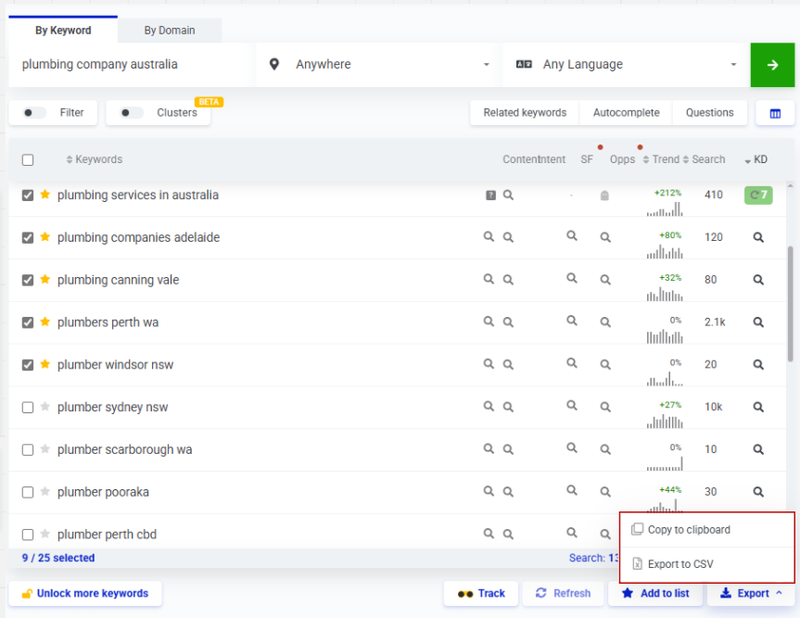
Import the .csv file into Google Sheets (or your chosen spreadsheet tool) via File → Open.
Duplicate the sheet to maintain a backup:
- Rename the original “Canonical List”
- Rename the working copy “Keyword Mapping Blueprint”
Only make edits in the Keyword Mapping Blueprint.
Centre-align all text and resize cells so all data is clearly visible.

Add filters and sort entries by Search Volume.

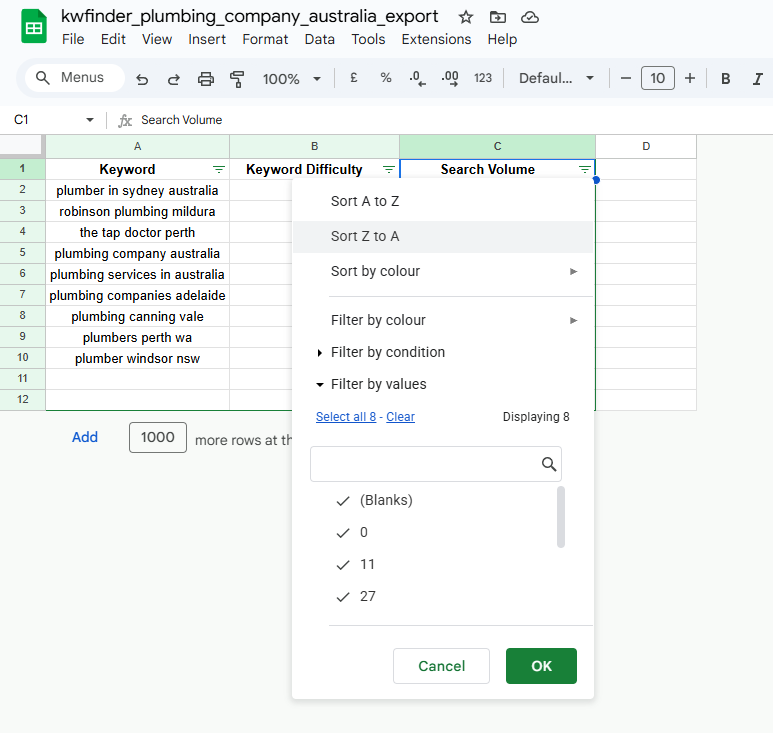
Remove unnecessary columns (e.g. CPC, PPC Competition).
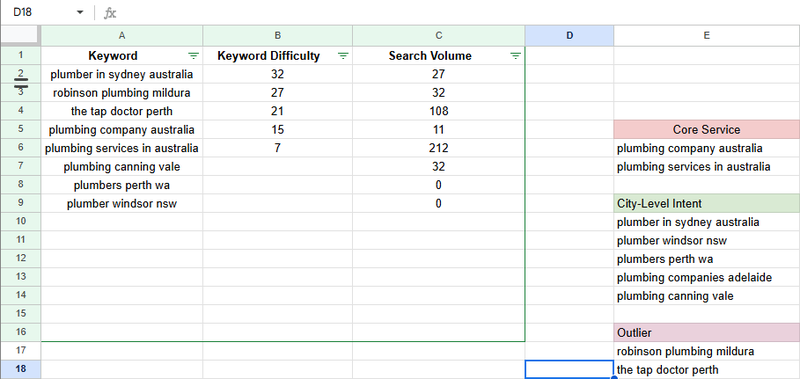
Group keywords by search intent into smaller lists called “buckets.”
For example:
- “plumbing company Australia” and “Australian plumbing company” share the same national-level service intent
- “plumber Sydney” and “Sydney emergency plumber” represent local, city-level intent
Rename each bucket based on the page it would logically support (e.g. /plumbing-services, /plumber-sydney).
Keywords that do not fit anywhere should be placed into an “Outlier” bucket, which can later be used for blog content or further research.
Apply different background colours to each bucket. Once organised, remove empty columns and consolidate buckets into the same columns, separating them with blank rows.
Use Your Keyword Map to Make Business Decisions
Once your keyword research and mapping are complete, you can move directly into implementing the keywords on your website. However, if you want to maximise the value of your work, you can take things a step further by using your keyword buckets to inform business-level decisions.
Once you have completed your keyword research and mapping, you may proceed directly to implementing the keywords on your website. However, if you wish to maximise the value of your work, you can take this process further by using your keyword buckets to perform business-level calculations and make data-informed decisions.
Each keyword bucket can be used to estimate potential outcomes, ranging from total monthly website traffic to a high-level projection of potential revenue. Below are the steps to follow if you want to better understand your potential market size and determine which user intents deserve the highest priority.
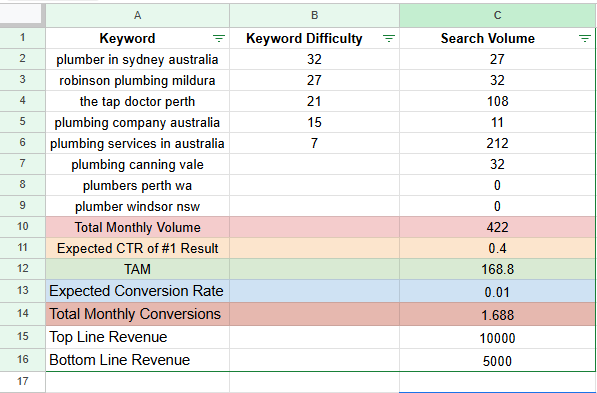
Create a row labelled “Total Monthly Volume.” Select the cell where you want the total monthly search volume to appear. In Google Sheets, open the “Functions” menu, select “SUM,” and highlight the cells containing the search volume values you want to aggregate. The spreadsheet will automatically calculate and display the total.
Create a row titled “Expected CTR of #1 Result” (CTR meaning Click-Through Rate). This value typically ranges between 35% and 40% for the top-ranking result. For the purpose of this example, use 40% (entered as 0.4 in the spreadsheet).
Create a row labelled “TAM” (Total Addressable Market). This value is calculated by multiplying the Total Monthly Volume by the Expected CTR of #1 Result.
To calculate this, type “=”, then select the cell containing the Total Monthly Volume (for example, C10), followed by “*”, and then the cell containing the Expected CTR value (for example, C11).
The formula will resemble:
=C10*C11
Next, add a row titled “Expected Conversion Rate.” If you already know your website’s conversion rate, use that value. If not, apply a reasonable estimate. In this example, a 1% conversion rate (entered as 0.01) is used. Keep in mind that conversion rates vary significantly depending on industry, business model, and location.
Add another row labelled “Total Monthly Conversions.” Calculate this by multiplying TAM by the Expected Conversion Rate, following the same method used in the previous calculations.
Next, create a row for “Top Line Revenue” (gross revenue per conversion) and another for “Bottom Line Revenue” (net revenue per conversion). These values will vary widely between businesses. For the purpose of this example, $10,000 is used for Top Line Revenue and $5,000 for Bottom Line Revenue.
Create two additional rows: “Monthly Top Line Revenue” and “Monthly Bottom Line Revenue.”
Calculate each by multiplying Total Monthly Conversions by the respective revenue values.
Important Note
These calculations rely on multiple assumptions, including search volume accuracy, ranking position, and conversion rates, all of which vary by market and location. This exercise should be viewed as a high-level estimate, not a precise forecast. However, it provides valuable insight into the potential impact of a well-executed SEO strategy.
As noted from the outset, keyword research and mapping are not difficult tasks, but they are undeniably time-consuming. They require consistency, discipline, and attention to detail.
Search behaviour, user intent, trends, and keyword demand continuously evolve. Accordingly, your SEO strategy must adapt. For this reason, keyword research and mapping should be revisited on a regular basis, applying the same level of rigour each time to remain aligned with current search opportunities.