12 Jun 2026
How to Analyse Competitor Backlinks and Build a Link Strategy
Understanding your competitors’ backlink profiles is essential for building a strong SEO strategy. This guide shows you how to analyse backlink data, uncover link-building tactics and identify opportunities to improve your search visibility.
Guide
Goal: To develop a clear and structured overview of your competitors’ backlink authority and link-building strategy.
Ideal Outcome: You create a document that summarises your competitors’ backlink performance, identifies their strategies, and includes a classified list of all discovered backlinks.
Prerequisites or Requirements:
You will need the following:
- Access to an Ahrefs account.
- Access to Google Sheets or a similar spreadsheet tool.
Why This Is Important:
Analysing competitor backlinks helps you:
- Understand the level of authority your competitors possess.
- Estimate the effort required to compete with them in search rankings.
- Identify link-building strategies that are working within your industry.
- Discover link opportunities you may be able to replicate.
Where This Is Done:
- Ahrefs
- Google Sheets
When This Is Done:
- When starting SEO work on a new website.
- Repeated every three months to monitor changes in competitor strategies.
Who Does This:
- SEO specialist
- Digital marketing specialist
- Website manager responsible for SEO performance
Included Resource
Competitor Backlink Strategy Template
Identify Your Competitors
Choose the scenario that best applies to your situation:
- Option 1: Identify competitors for a specific keyword.
- Option 2: Identify competitors across all keywords your site ranks for.
Option 1: Finding Competitors for a Specific Keyword
If you want to identify competitors targeting a specific keyword:
- Open Google in Incognito Mode.
- Search for your target keyword.
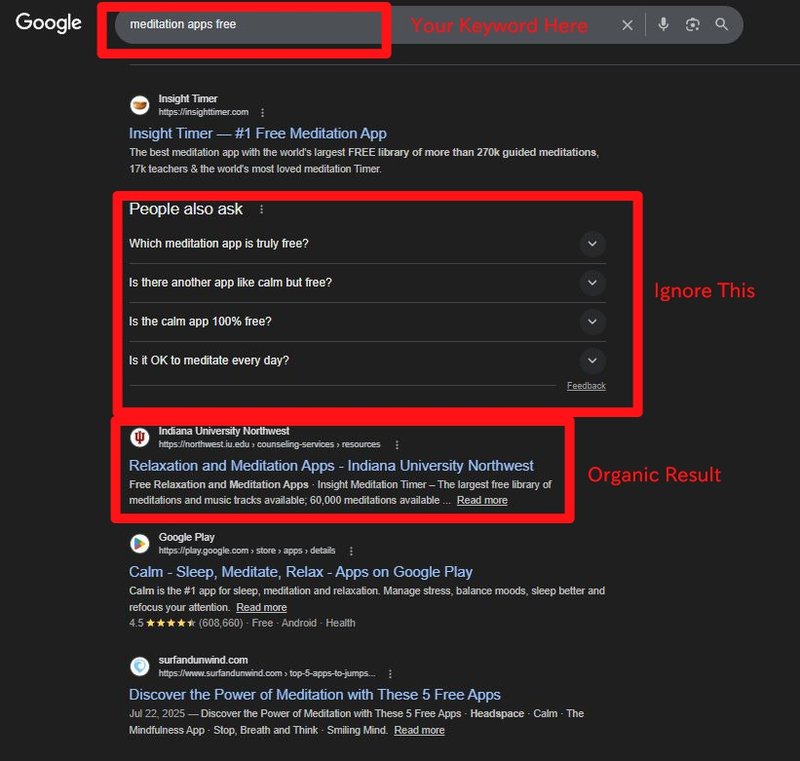
- Review the organic search results on the first page.
Important:
Ensure your IP address corresponds to the market you are targeting.
Example:
- If targeting the United States market, use a US-based VPN.
- If targeting Australia, ensure your IP location is Australian.
You can verify your IP address using an online IP lookup tool.
Next:
- Review the websites ranking on the first page.
- Select competitors that are slightly larger or similar in size to your business.
Avoid selecting extremely large brands such as:
- Wikipedia
- Coca-Cola
- Amazon
These organisations typically have significantly larger marketing resources and backlink profiles, making them unrealistic benchmarks for most businesses.
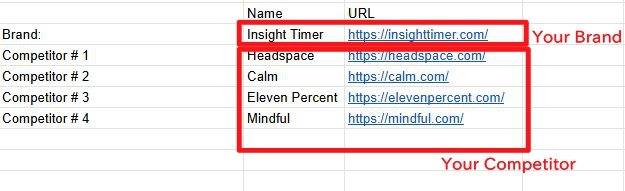
Add the selected competitors to your Competitor Backlink Strategy Template.
Option 2: Identifying Competitors Across All Keywords
If you want to find competitors based on your overall keyword landscape:
- Open Ahrefs.
- Enter your domain in the search bar.

- Navigate to Organic Search.
- Select the country market you are targeting.
Ahrefs will display a list of Top Competitors based on overlapping keywords.
Next:
- Review the list of domains.
- Select competitors that are comparable or slightly larger than your website.
- Avoid selecting extremely large global brands unless they are genuine direct competitors.
Add these domains to your Competitor Backlink Strategy Template.
Prepare Your Spreadsheet
Once your competitors are identified:
- Duplicate the Competitor Sheet for each competitor.
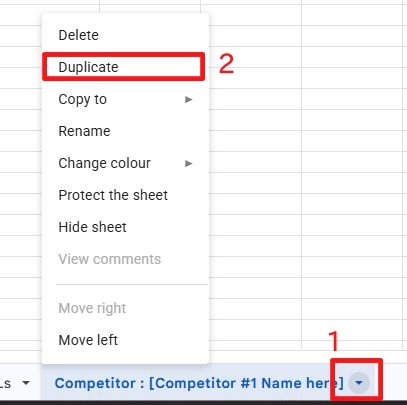
Rename each sheet using the competitor’s name.
Example:
- Competitor – ExampleSite
- Competitor – IndustryLeader
- Competitor – LocalRival
Each competitor should have their own analysis sheet.
Analyse Your Competitors’ Link Profiles
Perform the following process for each competitor.
Step 1: Analyse Core Backlink Metrics

Search the competitor’s domain in Ahrefs.
At the top of the report, record the following metrics:
- Ahrefs Rank (AR)
Indicates the strength of a website’s backlink profile relative to all other websites.
Lower numbers indicate stronger backlink authority. - Domain Rating (DR)
Measures the strength of a website’s backlink profile on a logarithmic scale from 0 to 100. - URL Rating (UR)
Measures the strength of the backlink profile for a specific page. - Backlinks
Total number of backlinks pointing to the domain. - Referring Domains
Number of unique websites linking to the domain.
Add these metrics to your spreadsheet.

Step 2: Review the Link Acquisition Timeline
Scroll down to view the Backlinks Growth Timeline.
What to analyse:
- Sudden increases in backlinks.
- Periods where a large number of links were acquired quickly.
These spikes may indicate:
- A successful marketing campaign.
- A content marketing initiative.
- Digital PR activity.
- Partnerships or sponsorships.
Record relevant observations in the comments section of your spreadsheet.
Step 3: Analyse Geographic Link Distribution
Review the Country TLD Distribution Map.
This visualisation shows the geographic origin of backlinks.
Typical patterns include:
- Global brands receiving links from many countries.
- Local businesses receiving links primarily from their target country.
Potential warning signs include:
- Large volumes of backlinks from unrelated countries.
Example:
If a website targeting Spain receives the majority of links from Russia (.ru) domains, this may indicate an unnatural backlink profile.
Add observations to your spreadsheet comments.
Step 4: Analyse Anchor Text Distribution
Navigate to the Anchors Report.
Analyse the most frequently used anchor texts linking to the site.
A natural anchor profile typically includes:
- Brand name anchors
- Generic anchors (e.g., “here”, “website”, “click here”)
- URL anchors
Potential warning signs include:
- A high concentration of exact-match keyword anchors.
- Repetitive commercial keywords.
- Irrelevant or unusual anchor text.
Examples of possible explanations:
- Aggressive SEO link building
- Historical rebranding
- Mergers or acquisitions
- Negative SEO activity
Record key insights in the spreadsheet.
Export the Backlink Profile
To export backlink data:
- In Ahrefs, navigate to Backlinks.
- Apply the filter One link per domain.
This ensures each referring domain appears only once.
- Click Export.
- Download the data as a CSV file.
Import Data Into Your Spreadsheet
Open your Competitor Backlink Strategy Template.
- Navigate to the sheet for the competitor.
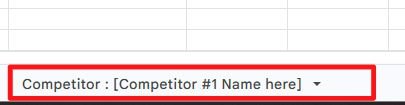
- Ensure the cursor is placed in Cell A1.

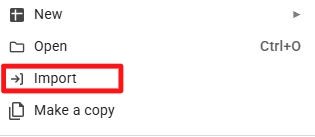
- Click File → Import. Select the CSV file you exported.
Choose the option:
- Replace data at selected cell
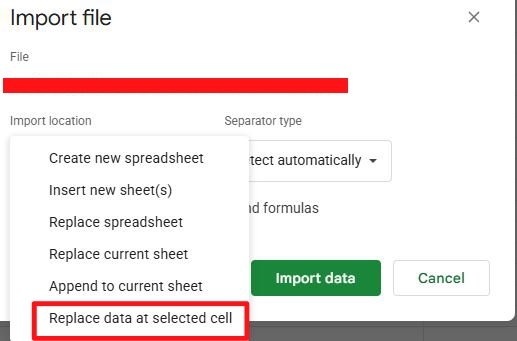
Then click Import Data.
The backlink data will populate automatically if the column headers align correctly.
Important:
Do not modify the column headers in the template.
Classify Each Backlink
Review each backlink and complete the following fields.
Link Type
Classify the type of link.
Examples:
- Directory
- Forum
- Blog article
- Comment
- Review
- Testimonial
- Partnership
- Affiliate
- Podcast
- App store listing
- Social media
- Guest article
Spam
Evaluate whether the link appears spammy.
Indicators of spam include:
- Gambling or adult websites
- Pharmaceutical spam
- Pages containing dozens or hundreds of outbound links
- Low-quality or irrelevant content
- Suspicious or poorly structured domains
Mark these links accordingly.
Attainable
Determine whether you could realistically acquire a similar backlink.
Examples:
- Business directory listings
- Industry forums
- Guest blogging opportunities
- Partnerships or sponsorships
Consider your current resources and capabilities.
Action to Take
Identify any strategic actions you may want to pursue based on the discovered links.
Example actions include:
- Listing your business in the same directories.
- Creating similar content that attracted backlinks.
- Launching campaigns similar to successful competitor initiatives.
- Reaching out to websites linking to competitors.
Example:
If a competitor launched a public health campaign that generated significant media coverage, you may consider launching a similar initiative and contacting those publications.
Final Outcome
At the end of this process, you will have:
- A comprehensive overview of competitor backlink authority.
- A detailed breakdown of their link-building strategy.
- A classified backlink database.
- A list of realistic link opportunities for your own SEO strategy.