Overview
Cemoh's AI matching feature analyses your project description in plain English and automatically finds the most suitable consultants based on their skills, experience, and availability.
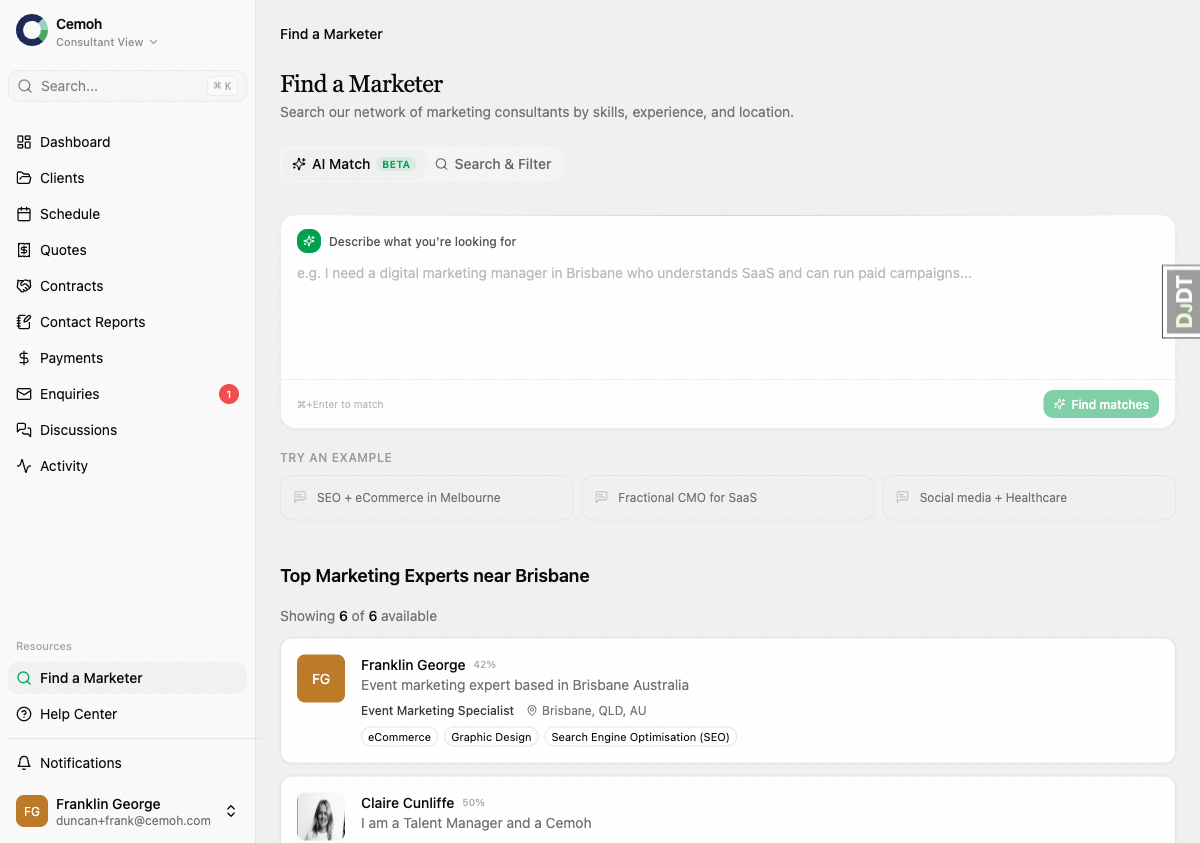
How to Use AI Match
- Go to Find a Marketer in the sidebar
- Click the AI Match tab
- Describe your project in the text box — for example: "I need an experienced SEO specialist to help improve our e-commerce site rankings. We're in the retail industry and based in Melbourne."
- Click Find Matches
Understanding Match Results
The AI analyses your description and extracts key requirements like:
- Required skills and expertise
- Industry experience
- Location preferences
- Role type needed
Each matched consultant shows a match percentage indicating how well they fit your requirements. Higher percentages mean a closer match to your described needs.
Tips for Better Matches
- Be specific about the marketing skills you need
- Mention your industry or business type
- Include your preferred location if relevant
- Describe the scope of work (ongoing, project-based, etc.)
Next Steps
Once you've found consultants you're interested in, click their profile to learn more, or submit an enquiry directly to start a conversation.